Questions / Answer
What Is a FedRAMP Authorization Boundary, and How Do I Draw It for My Service?
Your assessor cannot test what you have not drawn. The boundary is the drawing that says what counts as your service.
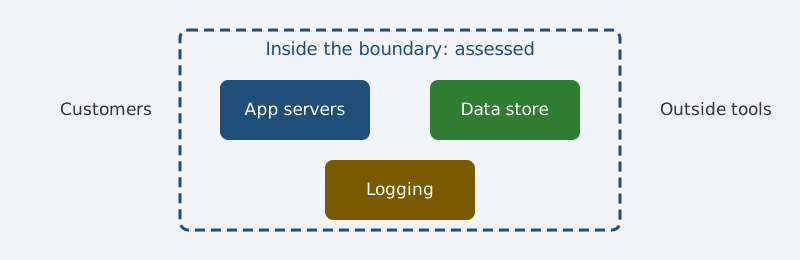
FedRAMP means Federal Risk and Authorization Management Program. CSP means Cloud Service Provider. SSP means System Security Plan. 3PAO means Third-Party Assessment Organization. CSO means Cloud Service Offering.
This article explains FedRAMP only. It does not claim any authorization.
What the boundary is
The boundary is a line around your service. Everything inside the line gets assessed. Everything outside it does not. FedRAMP guidance says the boundary covers components you own and control. It also covers connections to outside services. It must account for all federal data that flows through it.
Draw it in four steps
First, list every component that stores federal data. Second, list every component that moves federal data. Third, list every outside service that touches that data. Fourth, draw each connection and label what flows on it. Check that the diagram matches the SSP text. If the two disagree, fix the diagram first.
Keep the boundary small on purpose
Shared tools can drag your whole company inside the line. Keep federal workloads apart from general company tools. Do not send federal data into shared chat or ticket tools. Name a customer responsibility only where the customer truly owns it. Anything vague here becomes a finding later.
What assessors check
Assessors check the boundary before they check controls. They look for missing components and hidden connections. They look for data flows the diagram never shows. A clean boundary makes the rest of the review faster.
Sources
- FedRAMP CSP Authorization Playbook.
- FedRAMP Authorization Boundary Guidance.
- NIST SP 800-53 Revision 5, Security and Privacy Controls.
- Original diagram by PolicyCortex.
Next step
Want boundary evidence tied to each control? See how PolicyCortex collects it from live systems.